

IT Infrastructure & Networking
IT infrastructure and networking that your business can rely on
Slow Wi-Fi, dropped calls and a cupboard full of unlabelled cables are infrastructure problems. We design, install and manage networks properly.
- Priced
- Per user or device
- Coverage
- Herts, Essex, London
- Security
- Built in
- Since
- 2001
What is it infrastructure & networking?
Dig IT Solutions designs, installs and manages business networks across Hertfordshire, Essex and London: structured cabling and fibre, UniFi and Cisco Meraki switching, firewalls and Wi-Fi, guest and IoT segmentation, and site-to-site connectivity for multi-location businesses. Because the same team supports your users, the network is built for how you actually work and is monitored afterwards, not just handed over.
Problems we fix
The problems this service exists to solve
Wi-Fi that drops in half the building
Consumer access points, no site survey, thick walls or a large site, and staff tethering to their phones to get work done.
A network nobody understands
Unlabelled patch panels, daisy-chained switches under desks, and a firewall configured years ago by someone who has left.
Sites that cannot talk to each other
A second office or depot working from emailed spreadsheets because there is no secure link back to the main systems.
Phones and cloud apps suffering
VoIP calls breaking up and cloud applications lagging because the network has no traffic prioritisation and the connection is saturated.
Scope
What is included
Network design and site surveys
A survey of the building, users and applications, then a design with VLANs for staff, guest and devices, sized switching, and Wi-Fi coverage planned before anything is bought.
Structured cabling and fibre
Cat6 and Cat6a cabling, fibre between buildings, tidy patch panels and cabinets, every port labelled, tested and documented.
Wi-Fi installation
UniFi and Cisco Meraki access points placed from survey data, with Wi-Fi 6, 6E or 7 depending on density, separate guest networks and bandwidth controls where needed.
Firewalls and security
Business-grade firewalls with content filtering, intrusion prevention and secure remote access, configured to a documented standard and kept updated.
Multi-site and remote connectivity
Site-to-site VPNs, teleworker gateways for home offices, 4G or 5G failover and centrally managed configuration so every location behaves the same way.
Connectivity procurement
Business broadband, FTTP and leased lines sourced and project-managed, including the lead times that catch office moves out.
Monitoring and management
Cloud-managed networks mean we see a failing switch port, a rogue device or a saturated link before staff report it, and can fix most issues remotely.
In more detail
IT Infrastructure & Networking: specific services
- Office Wi-Fi InstallationOffice Wi-Fi installation with a proper site survey, UniFi or Cisco Meraki access points, VLANs for guests and IoT, and Wi-Fi 6, 6E or 7 where it pays.
- Structured CablingStructured cabling for offices and sites: Cat6 and Cat6a data cabling, fibre between buildings, patch panels, labelling and testing by Hoddesdon engineers.
- Multi-Site ConnectivityMulti-site connectivity for businesses with several sites: site-to-site VPN, SD-WAN style failover, 4G and 5G backup and central UniFi or Meraki management.
Outcomes
What changes for the business
- Wi-Fi that works in every room, including the one with thick walls
- A documented network your next engineer can understand
- Every site and home worker securely on the same systems
- Calls and cloud applications that stop competing for bandwidth
Proof
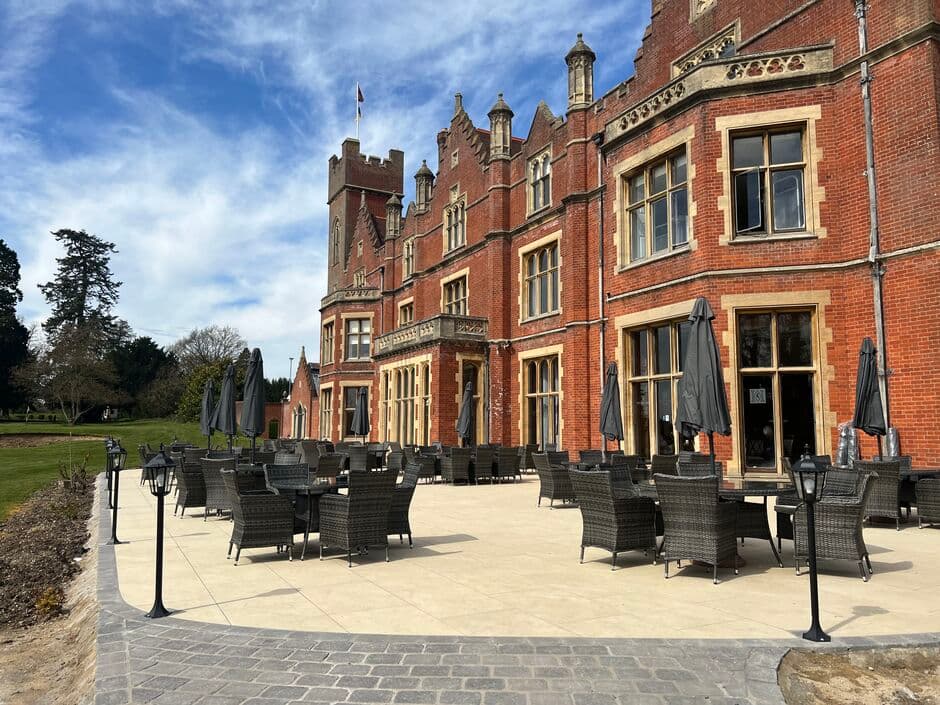
The Hertfordshire Golf & Country Club: a modern network inside a 16th-century mansion
The Hertfordshire Golf & Country Club at Broxbournebury Mansion, Broxbourne, needed an entire network built from nothing across a large, diverse site whose Grade II listed clubhouse made traditional cabling impractical. Dig IT Solutions designed a UniFi-based network, mesh Wi-Fi, guest access and a camera system, and has supported the club for over five years.
- 5+
- 0 → full
- ~50%
- 16th C
What clients say about working with us
“Our client Frederick had ongoing issues with slow internet despite upgrading his package. We asked Vince to take a look, and he quickly diagnosed the problem. He replaced outdated Wi-Fi access points with Wi-Fi 7 technology, and the improvement was immediate. Vince is professional, knowledgeable, and great value for money. We highly recommend him to our clients whenever the need arises.”
FAQ
Questions we are asked
Why is our office Wi-Fi so slow when we have fast broadband?
Do you install cabling as well as configure the network?
UniFi or Cisco Meraki: which should we use?
Can you connect our two offices securely?
How much does a business network installation cost?
Do you work in listed or older buildings?
Insights
Reading on it infrastructure & networking
Networking & Infrastructure
Why faster internet doesn't fix a slow network (and what usually does)
Why a broadband upgrade often leaves an office just as slow: bandwidth versus latency, Wi-Fi design, switches, cabling, firewall load and the real bottleneck.
Networking & Infrastructure
Signs your business network needs an upgrade (and what to upgrade first)
The signs an office network has been outgrown, what modern kit looks like (Wi-Fi 6/6E/7, multi-gig switching, Cat6a, VLANs) and what to upgrade first.
Networking & Infrastructure
Leased line vs business broadband (FTTP/SoGEA): which does your office need?
How a leased line compares with FTTP and SoGEA broadband on speed, upload, contention, fix times, lead times and cost, with Hertfordshire and London notes.
Next step
Talk to an engineer, not a sales script
Tell us what is not working, or what you are planning, and we will give you a straight view on what it would take to fix.